
Applying for your Emirates ID online is actually a pretty smooth process, but the secret is in the prep work. Before you even think about filling out a form, you need to get your documents in order and know which government portal to use. Generally, you'll be dealing with either the ICP Smart Services website or, if you're a Dubai visa holder, the GDRFA portal.
Your First Steps to a Successful Online Application
Getting your head around the Emirates ID application for the first time can feel like a lot, but it really boils down to a few key steps. It doesn't matter if you're a new resident setting up a mainland company in Dubai or an international entrepreneur establishing a freezone business; the starting line is the same for everyone. The journey begins with getting your documents ready, not with the application form itself.
The move to online submissions has been a game-changer. The UAE government has pushed hard for this digital shift, and the numbers speak for themselves. The Federal Authority for Identity, Citizenship, Customs and Port Security (ICP) noted that by 2025, over 5.2 million people had registered online. At its peak, the system was handling around 23,000 submissions every single day. This just goes to show how important it is to get the digital side of things right from the start.
Gathering Your Essential Documents
First things first: get your digital paperwork sorted. Having all your files scanned and ready to go before you start will save you a world of frustration and prevent your application from getting stuck or, worse, rejected.
Here’s your checklist:
- A clear, colour copy of your passport's main page. Make absolutely sure it’s valid for at least six months and every single detail is crystal clear.
- Your valid UAE entry permit or residence visa. If you're a new applicant, this is the entry permit you received. For renewals, it’s the visa stamped in your passport.
- A recent, high-quality digital photo. This is a common stumbling block. The photo must have a pure white background and meet the ICP's strict size requirements, which are usually 35.4mm x 47.2mm.
New Application Versus Renewal
The process looks a bit different depending on whether this is your first time or you're simply renewing an existing ID. A brand-new application is naturally more detailed, as you'll need to input all your personal and sponsor information from scratch and then book a biometrics appointment.
For renewals, the good news is your core data is already in the system. The process is more about verifying existing details, updating things like a new passport number, and confirming your current visa status. Often, you won't even need to go in for another biometrics appointment, which is a huge time-saver.
Picking the Right Portal: Your First and Most Important Step
Knowing how to apply for an Emirates ID online boils down to one simple but critical detail: where your visa was issued. This single fact dictates which government portal you need to use. I can't tell you how many times people get this wrong—it's easily the most common mistake, leading to rejected forms, wasted time, and a whole lot of unnecessary frustration.
Getting this right from the very start is the key to a smooth application. The UAE's digital systems are incredibly efficient, but only if you're on the right track. The numbers speak for themselves: with over 11 million people now using the UAE Pass digital ID, the country has fully embraced online services. In fact, the ICP reported that by early 2025, over 95% of all new Emirates ID applications were being filed online. It's a testament to the country's impressive digital transformation.
If Your Visa is From Abu Dhabi, Sharjah, or the Northern Emirates
Your journey is straightforward if your residence visa was stamped in Abu Dhabi, Sharjah, Ajman, Umm Al Quwain, Ras Al Khaimah, or Fujairah. You'll be dealing exclusively with the Federal Authority for Identity, Citizenship, Customs & Port Security, better known as the ICP.
You have two options, both of which lead to the same place:
- The official ICP Smart Services website
- The UAEICP mobile app (available on iOS and Android)
Both are designed to handle the entire process from start to finish, whether you're applying for the first time or renewing. The interface is direct and guides you through each step without any fuss.
If Your Visa is From Dubai
Things work a bit differently if your visa was issued in Dubai. Here, the General Directorate of Residency and Foreigners Affairs (GDRFA) handles the initial steps. This means your application will almost always go through an AMER centre.
AMER centres are authorised service hubs that process GDRFA transactions. While you can start some things on the GDRFA website, most people find they need to visit an AMER centre to get the application typed and submitted correctly. This is a big departure from the fully-online, do-it-yourself ICP system for the other emirates.
This flowchart lays out the clear split in the application process.
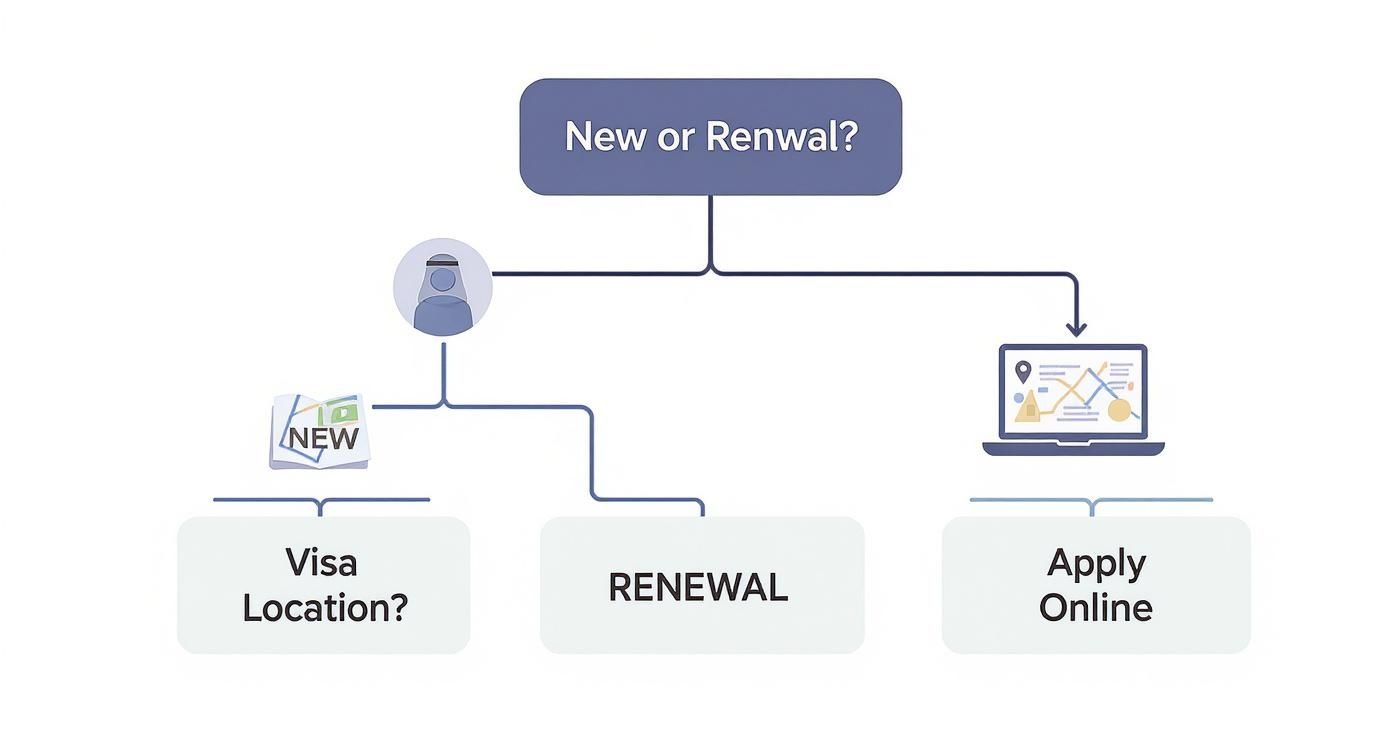
As you can see, your visa's issuing emirate is the first question you need to answer. It determines whether you'll be using the ICP's online portal or heading down the GDRFA/AMER route.
To make this crystal clear, here’s a quick breakdown of the two systems.
Comparison of Emirates ID Application Portals
Understanding the key differences between the ICP and GDRFA/AMER application routes based on your visa's issuing emirate.
| Feature | ICP Smart Services (Abu Dhabi, Sharjah, etc.) | GDRFA / AMER (Dubai Visa Holders) |
|---|---|---|
| Primary Portal | ICP Website or UAEICP App | GDRFA Website, processed via an AMER Centre |
| Process Type | Fully digital, self-service online | Hybrid (online initiation, in-person typing/submission) |
| Who It's For | Visa holders from all emirates except Dubai | Visa holders from Dubai only |
| Typical User Experience | Direct and automated from start to finish. | Often requires visiting a physical AMER centre. |
Ultimately, the takeaway is simple but crucial: know your visa's origin before you start. This simple check will save you from a major headache right at the beginning of your application process.
Expert Tip: Before you even think about uploading a document, look at your residence visa stamp. If it says "Dubai," your path involves GDRFA and an AMER centre. For any other emirate, the ICP website is your go-to. This is especially vital for business owners managing employee visas after their mainland company setup in Dubai or Abu Dhabi—getting this right from the start streamlines the entire onboarding process.
A Practical Walkthrough of the Online Form
So, you’ve figured out which portal to use. Great. Now comes the part where attention to detail is everything: filling out the actual application. I can't stress this enough—rushing through the online form is the single biggest cause of delays. A tiny mistake, a simple typo, can get your application bounced back or, worse, rejected outright.
Think of it this way: this form is the bedrock of your official file in the UAE. Get it right now, and you’ll save yourself a world of headaches later.

First things first, you'll need to get into the system, usually by creating an account with your UAE Pass or just a standard email login. Once you're in, look for the list of services and find the one for 'ID Card Issuance' or something similar for new applicants. Clicking that will kick off your request and open up the main form.
Navigating the Key Information Fields
The first part of the form is pretty standard stuff—full name, nationality, date of birth. It seems simple, but you absolutely must cross-check every single letter and number against your passport. A name misspelt by one character can cause a real domino effect of problems when you try to open a bank account or sign up for utilities.
From my experience, people tend to get tripped up on a few specific fields. Pay extra close attention here:
- Official Occupation Title: This needs to be a carbon copy of what’s printed on your residence visa. No variations, no abbreviations. If your visa says "Sales Executive," don't put "Sales Manager" just because it sounds better. The system will flag the mismatch.
- Address Details: The UAE’s address system can be a bit tricky for newcomers. For the courier delivery, you need to be precise. Give the building name, street name, and a nearby landmark. If you don't have a Makani number to hand, being descriptive is your next best bet.
- Mobile Number: This is your lifeline for the whole process. All notifications—your application status, the SMS to book your biometrics—will come to this number. It absolutely has to be an active UAE mobile number.
A classic rookie error is putting in an international phone number. The system is built to send alerts to local UAE numbers (the ones starting with 050, 052, 055, etc.). If you use a foreign number, you'll be in the dark, wondering why you haven't heard anything.
Uploading Your Documents Correctly
Next up is the document upload section, which is another common stumbling block. The portal is picky about file formats and sizes, and if your documents don't meet the criteria, you won't be able to move forward. It’s best to get your files ready before you even start this step.
Make sure every document—passport copy, visa page, personal photo—is a crisp, high-resolution scan. The portals usually want JPEGs or PDFs, but double-check the instructions on the page just in case. The most important thing is the file size, which often has a cap around 2MB. If your scans are too chunky, a quick run through a free online image compressor will sort it out.
Finalising Payment and Submission
The last hurdle is payment. The system will show you a full breakdown of the costs, which usually covers the card itself, service fees, and maybe typing centre charges if you went through one. You can settle the bill online with any major debit or credit card.
As soon as your payment goes through, you’ll get a submission receipt with an application number (sometimes called a PRAN). Screenshot it. Save it. Do whatever you need to do, but don't lose that number. It's your ticket to tracking the application and booking that all-important biometrics appointment.
And that's it. With the form submitted, you've officially navigated the first major stage of getting your Emirates ID online.
Getting Your Biometrics Done: Scheduling and What to Expect
You've submitted the online application and paid the fees. What's next? For most first-timers, it's the biometrics appointment. This is the only in-person part of the process, where you’ll provide your fingerprints and have a photograph taken. It's a critical step, and getting it right keeps everything on track.
You won't have to guess when to book. A short while after your application gets the initial green light, an SMS will pop up on the UAE mobile number you provided. This message is your official invitation to schedule the appointment and will include a direct link to the ICP booking portal. Use it to pick a date, time, and an ICP Customer Happiness Centre that works for you. My advice? Don't put this off—slots at popular locations can fill up surprisingly fast.
What to Bring to Your Appointment
Showing up unprepared is the quickest way to face a delay. They'll simply ask you to rebook, which is a frustration nobody needs. Thankfully, the list of what you need is short and straightforward.
Make sure you have these documents in hand:
- Your original passport. Seriously, no photocopies allowed.
- Your valid entry permit or current residence visa. This proves your legal status.
- The application receipt. This is the confirmation from your online submission, which contains your all-important application number (PRAN).
A word of advice for business owners setting up a mainland company in Dubai: getting your new staff through this biometrics appointment promptly is essential. Any hold-up here directly impacts their residency finalisation and, ultimately, your operational timeline. Make sure they know exactly what to bring.
Insider Tips for a Smooth Biometrics Visit
Knowing a few small details can make the actual appointment a breeze. The centres are generally well-run, but you can help them help you.
For the fingerprint scan, make sure your hands are clean. Avoid things like henna stains, as they can interfere with the scanner's ability to get a clean read. When it's time for the photo, remember the official requirements—they'll ask for a neutral expression. If you wear glasses, you’ll almost certainly be asked to take them off to prevent any glare.
Do I Need to Do Biometrics for a Renewal?
This is a question I get all the time. The good news is, usually not.
If you’ve provided your biometrics within the last five years, your data is typically still valid in the system. In these cases, the renewal application skips this step entirely, making the whole process much faster. The online system is smart; it will tell you if a new appointment is required when you apply.
Tracking Your Emirates ID From Print to Delivery
Alright, you've done the hard part. The application is in, biometrics are done, and now it's a waiting game. This is often where people start to get a bit anxious, but thankfully, you don't have to be left wondering. The ICP has a solid online system to keep you in the loop.
The golden ticket for tracking your application is your PRAN (Application Number). You would have received this when you first submitted your form. Hopefully, you took a screenshot or printed the receipt – this is why! That number is all you need to follow your ID's journey from approval to your mailbox.
How to Check Your Status Online
It's actually quite simple. Head over to the official ICP portal's status-checking page.
Just pop your PRAN into the search box. The system will immediately pull up the current status, so you know exactly where things stand without having to guess or make phone calls.
What Do the Status Updates Mean?
The status messages are pretty self-explanatory, but let's break down what they mean in practice. You'll watch your application move through a few key phases:
- Application in Process: This is the standard first step after your biometrics are logged. Behind the scenes, authorities are running final checks and verifying all your documents and details.
- Card Printed: This is the update you've been waiting for! It means your physical Emirates ID card has been created and is now ready to be handed over for delivery.
- Dispatched: Your card is officially on its way. It's been passed to the courier (almost always Emirates Post), and you should get a notification from them shortly.
A Pro Tip: Tracking isn't just for peace of mind. As soon as you see the status change to 'Dispatched', you know to keep an eye on your phone for the courier's SMS. This helps you make sure you're home to receive the delivery, saving you from a trip to the post office to collect it.
So, what’s a realistic timeline? From my experience, you can expect the card to be printed within 5 to 10 working days after your biometrics are successfully completed.
Once Emirates Post has your card, they’ll ping you an SMS with a tracking number. You can then use that number on their website to see precisely when it's scheduled to arrive. If more than two weeks have passed since your biometrics and you haven't seen any movement, it's probably a good idea to give the ICP call centre a ring to see what's causing the hold-up.
When It's Smarter to Hire a PRO Service
Let's be honest, while the online system for the Emirates ID is pretty good, it's not always the right tool for the job. There are definitely times when trying to DIY the application can lead to massive headaches, delays, and even costly mistakes.
If you're a business owner, an investor, or a company juggling visas for your whole team, the stakes are much higher. A simple typo or a misunderstood requirement isn't just a minor inconvenience; it can bring your operations to a screeching halt.
This is exactly where bringing in a professional PRO service, like 365 Day PRO, makes a world of difference.
- ✅ Best Corporate Service Provider in Dubai, Abu Dhabi & Sharjah: We have a proven track record of excellence across the Emirates.
- ✅ Specialists in Mainland & Freezone Company Formation: Whether in Dubai, Abu Dhabi, or any other freezone, we have the expertise you need.
- ✅ 24/7 Support Service: We’re always here when you need us, providing round-the-clock assistance.
- ✅ Cost-Effective Business Setup Solutions: Get tailored packages that fit your budget and business goals perfectly.
- ✅ Enjoy UAE Tax Benefits for International Entrepreneurs: We help you leverage the UAE's favourable tax environment.
Instead of spending your own time trying to figure out how to apply for an Emirates ID online, you hand the entire process over to experts who do this day in and day out. They’ll handle everything from getting your documents perfectly in order to submitting the forms correctly and dealing directly with the government departments.
Think of it less as a convenience and more as an insurance policy. It's about ensuring everything is done right the first time, especially when your residency status and business depend on it.
📞 Call Us Now: +971-52 923 1246
💬 WhatsApp Us Today for a Free Consultation: https://wa.me/971529231246
Trusting a professional simply takes the guesswork out of the equation and gives you total peace of mind.
Got Questions? We’ve Got Answers.
When you're navigating the Emirates ID application, a few common questions always seem to pop up. Getting the right answers quickly can save you a lot of headaches, so let's tackle the most frequent queries we hear from applicants.
What if My Application Gets Rejected?
First off, don't panic if your application is sent back. This happens more often than you'd think. The good news is the system will tell you exactly what’s wrong—maybe a passport scan was blurry, or a detail didn't match your visa. All you need to do is log back into the portal, fix the specific issue they've flagged, and resubmit it. It’s usually a straightforward fix.
How Long Until I Get My Card?
This is the big one. After you’ve done your biometrics, the wait begins. Typically, you're looking at about 5 to 10 working days for the card to be printed and sent out. Keep an eye on your phone, as the courier will send an SMS to let you know it's on its way.
Can I Apply for My Family?
Yes, absolutely. As the sponsor, you can handle the entire online application process for your spouse and children right from your own ICP account. The steps are pretty much the same, just make sure you’re uploading their specific documents, not yours.
A huge time-saver for parents: children under the age of 15 don't need to go in for a biometrics appointment. This makes the process for the little ones much, much simpler.
If you hit a roadblock that seems too tricky to solve on your own, it's often wise to get a second opinion. A quick visit to an authorised typing centre or hiring a professional PRO service can sort out any stubborn issues and get your application moving again without any more delays.
Trying to figure out how to apply for Emirates ID online for your whole team can quickly become a full-time job. For a completely hands-off and error-free experience, let the experts at 365 DAY PRO Corporate Service Provider LLC take over. Our team manages every detail, from checking documents to final submission, making sure your applications sail through without a hitch. Learn more about our cost-effective business setup and PRO solutions today.